USB 2.0
The i.MX RT1170 processor includes two USB 2.0 controllers (usb1 and usb2), both enabled in the current BSP-Zephyr-RT1170-PD26.1.0 release. usb1 (OTG1) is routed to connector X16 on the phyBOARD-Atlas RT1170 carrier board and serves as the phyCORE-RT1170 development kit’s USB-OTG Serial Downloader port, used for flashing firmware as described in the Installing the Firmware guide. usb2 (OTG2) is routed to connector X17 on the phyBOARD-Atlas RT1170 carrier board for application use.
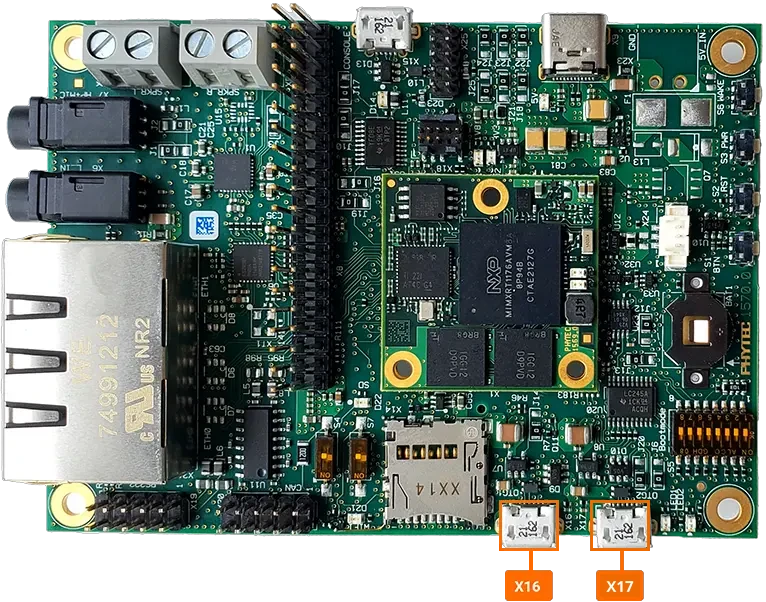
For detailed hardware-level information, refer to the 7.7 USB chapter in the Hardware Manual.
Build Usage
Note
The pre-built BSP-Zephyr-RT1170-PD26.1.0 sample application includes a USB Mass Storage Class (MSC) device that starts automatically at boot. It exposes an SD card inserted into the phyBOARD-Atlas RT1170 carrier board’s SD card slot as a USB disk to a connected host PC.
The sample’s board overlay (app/rt1170/boards/phyboard_atlas_mimxrt1176_cm7.overlay) redirects the zephyr_udc0 USB device controller alias to &usb2, which is why the MSC device enumerates on connector X17 (OTG2) rather than X16 (OTG1).
To use OTG1 (X16) instead, delete the following lines from the overlay and rebuild the application:
/delete-node/ &zephyr_udc0;

zephyr_udc0: &usb2 {
   status = "okay";
};
Insert an SD card into the phyBOARD-Atlas RT1170 carrier board’s SD card slot.
Connect a USB cable between your host PC and connector X17 on the phyBOARD-Atlas RT1170 carrier board.
The SD card will enumerate on the host PC as a removable USB Mass Storage disk.
Once connected, the target console logs the MSC device coming up:
[00:00:08.500,000] <inf> usbd_msc: Enable
[00:00:08.501,000] <inf> usbd_msc: Bulk-Only Mass Storage Reset
On the host PC, the sample exposes two SCSI disks: a small built-in RAMDisk and the inserted SD card. Check dmesg to confirm both were detected:
dmesg
usb 1-9.1.1: new high-speed USB device number 51 using xhci_hcd
usb 1-9.1.1: New USB device found, idVendor=2fe3, idProduct=cafe, bcdDevice= 4.04
usb 1-9.1.1: New USB device strings: Mfr=1, Product=2, SerialNumber=3
usb 1-9.1.1: Product: USBD MSC sample
usb 1-9.1.1: Manufacturer: Zephyr Project
usb 1-9.1.1: SerialNumber: 0428180E8295D12F
usb-storage 1-9.1.1:1.0: USB Mass Storage device detected
scsi host0: usb-storage 1-9.1.1:1.0
scsi 0:0:0:0: Direct-Access     Zephyr   RAMDisk          0.00 PQ: 0 ANSI: 4
scsi 0:0:0:1: Direct-Access     Zephyr   SD               0.00 PQ: 0 ANSI: 4
scsi 0:0:0:0: Attached scsi generic sg0 type 0
scsi 0:0:0:1: Attached scsi generic sg1 type 0
sd 0:0:0:0: [sda] 192 512-byte logical blocks: (98.3 kB/96.0 KiB)
sd 0:0:0:0: [sda] Write Protect is off
sd 0:0:0:0: [sda] Mode Sense: 03 00 00 00
sd 0:0:0:1: [sdb] 15859712 512-byte logical blocks: (8.12 GB/7.56 GiB)
sd 0:0:0:0: [sda] No Caching mode page found
sd 0:0:0:0: [sda] Assuming drive cache: write through
sd 0:0:0:1: [sdb] Write Protect is off
sd 0:0:0:1: [sdb] Mode Sense: 03 00 00 00
sd 0:0:0:1: [sdb] No Caching mode page found
sd 0:0:0:1: [sdb] Assuming drive cache: write through
sd 0:0:0:0: [sda] Attached SCSI removable disk
 sdb: sdb1
sd 0:0:0:1: [sdb] Attached SCSI removable disk
In this example, sda is the sample’s built-in RAMDisk and sdb (with partition sdb1) is the inserted SD card.
Note
For any technical questions, feel free to reach out to PHYTEC’s Support Portal!