GPIO
General-Purpose Input/Output (GPIO) pins can be configured as either inputs or outputs. Many signals of the phyFLEX-AM62Px SOM can be used as GPIOs through multiplexing. The AM62Px processor features three independent GPIO modules.
GPIO Signal Names and Chip Mapping
GPIOn_x is a generic name used to describe a GPIO signal, where n represents the specific GPIO module and x represents one of the input/output signals associated with the module. Usually you find these names in the schematics and in comments in our device trees in the muxing section.
The AM62Px provides three GPIO modules:
GPIO0
GPIO1
MCU_GPIO0
In addition, the TPS65219 PMIC (U6) on the phyFLEX-AM62Px provides three GPIOs, and the phyFLEX-Libra AM62Px provides two TCAL6416 16-bit I2C GPIO expanders (see GPIO Expanders). Linux represents all of these as gpiochips. You can list them using the gpiodetect command:
am62pxx-phyflex-libra-rdk-1:~# gpiodetect
gpiochip0 [tps65219-gpio] (3 lines)      # PMIC GPIO (WKUP_I2C0 @ 0x30)
gpiochip1 [4201000.gpio] (24 lines)      # MCU_GPIO0
gpiochip2 [600000.gpio] (92 lines)       # GPIO0
gpiochip3 [601000.gpio] (52 lines)       # GPIO1
gpiochip4 [2-0021] (16 lines)            # TCAL6416 U58 on I2C0 @ 0x21
gpiochip5 [3-0021] (16 lines)            # TCAL6416 U72 on I2C1 @ 0x21
The second column shows the hardware address of each GPIO module. In the device tree, these GPIOs are accessed using node labels:
main_gpio0 (gpio@600000)
main_gpio1 (gpio@601000)
mcu_gpio0 (gpio@4201000)
Note
GPIO chip numbers may change between system boots. For consistent numbering, configure udev rules.
GPIO Expanders
The phyFLEX-Libra AM62Px has two TCAL6416 GPIO expanders, U58 on I2C0 (address 0x21) and U72 on I2C1 (address 0x21). Their lines are named in the device tree, so libgpiod tools can refer to them by name (for example gpioget X_RTC_nINT).
Line |
Expander 1 (U58, I2C0, 0x21) |
Expander 2 (U72, I2C1, 0x21) |
|---|---|---|
0 |
VCONN_nFAULT |
CAN1_STBY |
1 |
X_CSI1_CTRL1 |
CAN2_STBY |
2 |
X_CSI1_CTRL3 |
CAN3_STBY |
3 |
X_CSI1_CTRL4 |
X_KEY-E_nALERT |
4 |
USB-C_nINT/AUDIO_AC |
X_KEY-M_nALERT |
5 |
X_CSI2_CTRL1 |
X_SDIO_nWAKE |
6 |
X_CSI2_CTRL3 |
X_SDIO_nRESET |
7 |
X_CSI2_CTRL4 |
HDMI_EN |
8 |
CLK_EN_AV |
X_RTC_nINT |
9 |
X_W_nDISABLE1 |
LVDS1_BL_EN |
10 |
X_W_nDISABLE2 |
SFP_TX_FAULT |
11 |
X_PCIE1_nWAKE |
SFP_TX_DISABLE |
12 |
X_PCIE2_nWAKE |
SFP_MOD_ABS |
13 |
X_UART1_nWAKE |
SFP_RS0 |
14 |
UART1_BT_RS_SEL |
SFP_RX_LOSS |
15 |
UART1_RS232_485_SEL |
SFP_RS1 |
Note
CAN1_STBY is used by the CAN transceiver driver and is not available from userspace.
Active GPIO Signals
The following command shows GPIO signals that are currently allocated by kernel drivers. These GPIOs are already in use and attempting to access them with gpioget or gpioset will result in a “Device or resource busy” error.
See the allocated GPIO signals by running:
am62pxx-phyflex-libra-rdk-1:~# cat /sys/kernel/debug/gpio
gpiochip0: 3 GPIOs, parent: i2c/1-0030, tps65219-gpio, can sleep:

gpiochip1: 24 GPIOs, parent: platform/4201000.gpio, 4201000.gpio:

gpiochip2: 92 GPIOs, parent: platform/600000.gpio, 600000.gpio:
 gpio-20  (                    |interrupt           ) in  hi IRQ
 gpio-42  (                    |id                  ) in  hi IRQ

gpiochip3: 52 GPIOs, parent: platform/601000.gpio, 601000.gpio:
 gpio-30  (                    |interrupt           ) in  hi IRQ

gpiochip4: 16 GPIOs, parent: i2c/2-0021, 2-0021, can sleep:
 gpio-0   (VCONN_nFAULT        )
 gpio-1   (X_CSI1_CTRL1        )
 gpio-2   (X_CSI1_CTRL3        )
 gpio-3   (X_CSI1_CTRL4        )
 gpio-4   (USB-C_nINT/AUDIO_AC )
 gpio-5   (X_CSI2_CTRL1        )
 gpio-6   (X_CSI2_CTRL3        )
 gpio-7   (X_CSI2_CTRL4        )
 gpio-8   (CLK_EN_AV           )
 gpio-9   (X_W_nDISABLE1       )
 gpio-10  (X_W_nDISABLE2       )
 gpio-11  (X_PCIE1_nWAKE       )
 gpio-12  (X_PCIE2_nWAKE       )
 gpio-13  (X_UART1_nWAKE       )
 gpio-14  (UART1_BT_RS_SEL     )
 gpio-15  (UART1_RS232_485_SEL )

gpiochip5: 16 GPIOs, parent: i2c/3-0021, 3-0021, can sleep:
 gpio-0   (CAN1_STBY           |standby             ) out lo
 gpio-1   (CAN2_STBY           )
 gpio-2   (CAN3_STBY           )
 gpio-3   (X_KEY-E_nALERT      )
 gpio-4   (X_KEY-M_nALERT      )
 gpio-5   (X_SDIO_nWAKE        )
 gpio-6   (X_SDIO_nRESET       )
 gpio-7   (HDMI_EN             )
 gpio-8   (X_RTC_nINT          )
 gpio-9   (LVDS1_BL_EN         )
 gpio-10  (SFP_TX_FAULT        )
 gpio-11  (SFP_TX_DISABLE      )
 gpio-12  (SFP_MOD_ABS         )
 gpio-13  (SFP_RS0             )
 gpio-14  (SFP_RX_LOSS         )
 gpio-15  (SFP_RS1             )
Using GPIOs
To access GPIOs from userspace applications, use the libgpiod library. This library provides tools for interacting with Linux GPIO devices. Here are some common usage examples:
List all available GPIO chips:
am62pxx-phyflex-libra-rdk-1:~# gpiodetect
gpiochip0 [tps65219-gpio] (3 lines)      # PMIC GPIO (WKUP_I2C0 @ 0x30)
gpiochip1 [4201000.gpio] (24 lines)      # MCU_GPIO0
gpiochip2 [600000.gpio] (92 lines)       # GPIO0
gpiochip3 [601000.gpio] (52 lines)       # GPIO1
gpiochip4 [2-0021] (16 lines)            # TCAL6416 U58 on I2C0 @ 0x21
gpiochip5 [3-0021] (16 lines)            # TCAL6416 U72 on I2C1 @ 0x21
Display detailed GPIO chip information (names, consumers, direction, active state, and flags):
am62pxx-phyflex-libra-rdk-1:~# gpioinfo -c gpiochip2
Read the value of a GPIO (e.g GPIO 36 from chip2):
am62pxx-phyflex-libra-rdk-1:~# gpioget -c gpiochip2 36
Set the value of GPIO 36 on chip2 to 0 and exit tool:
am62pxx-phyflex-libra-rdk-1:~# gpioset -z -c gpiochip2 36=0
Note
Interacting with a Signal as GPIO requires a proper muxing. The signal needs to be muxed in mux mode 7 (GPIO).
GPIOs via sysfs
Warning
Accessing GPIOs via sysfs is deprecated. We strongly encourage using libgpiod instead.
Sysfs GPIO access is no longer enabled by default. To enable it, enable CONFIG_EXPERT & CONFIG_GPIO_SYSFS in the kernel configuration.
Using LEDs
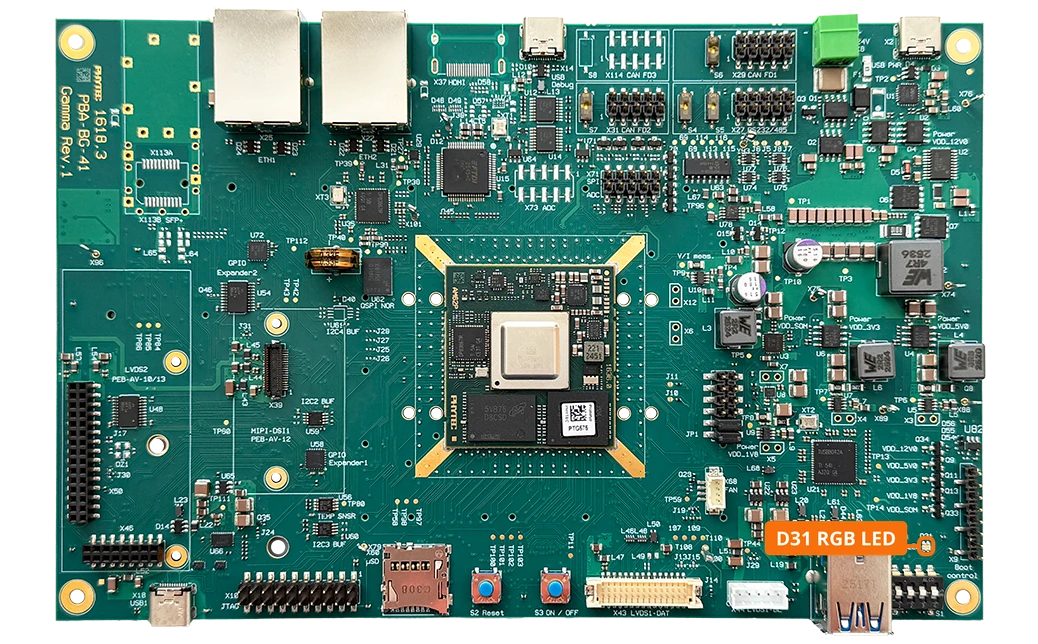
The phyFLEX-Libra AM62Px features an RGB LED (D31) driven by an NXP PCA9633 LED controller (U55) on I2C1 (address 0x62).
Note
The PCA9633 LED driver (CONFIG_LEDS_PCA963X) is not enabled in the BSP-Yocto-Ampliphy-AM62Px-PD26.2.0 kernel, so the RGB LED cannot be controlled from Linux in this release.