Booting Essentials
This section of the product wiki contains guides to update and boot from different boot sources on the phyFLEX-AM62Px SOM.
Boot Modes
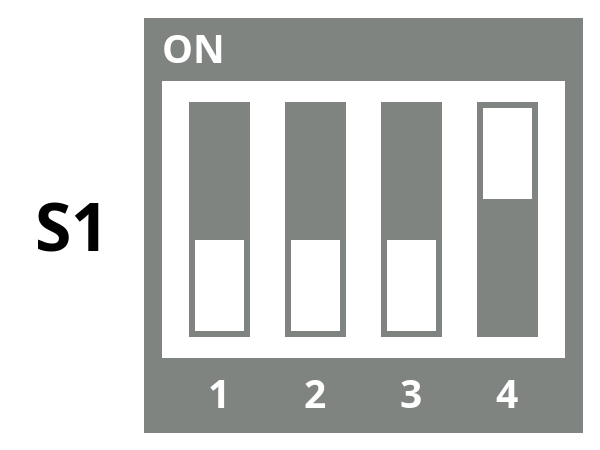
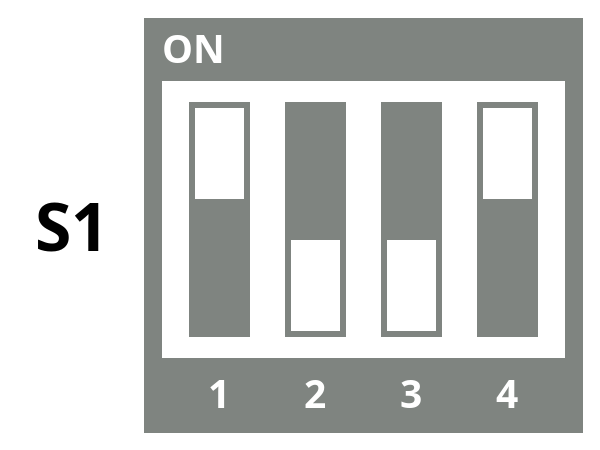
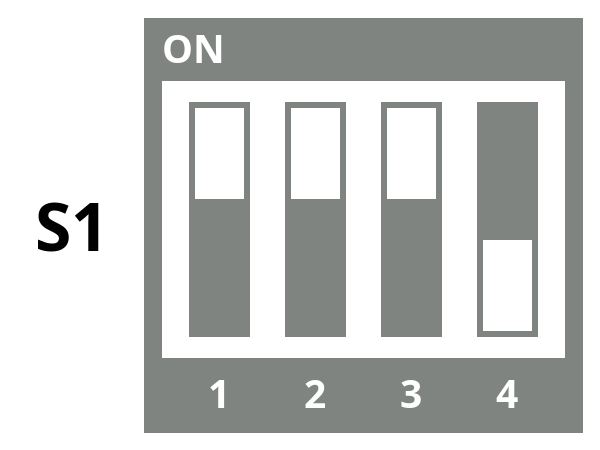
The boot device is selected with the 4-position boot switch S1 on the phyFLEX-Libra AM62Px. Each position drives one of the SOM’s BOOT_MODE1-4 signals (AM62Px BOOTMODE3-6) to 1 (1.8V) or 0 (GND). A position set to ON is 1, and a position set to OFF is 0. By default, the development kit is set to boot from the micro-SD card. Boot switches should be changed with power off.
Boot Device |
Switch Setting |
|---|---|
SD Card |
|
eMMC |
|
UART |
|
Tip
Look for the “ON” marking on S1 to confirm which way the switches point. The setting can easily be flipped depending on the orientation of the development kit.
Note
S1 only selects the primary boot device. The backup boot device is set on the SOM to the SD card.