I2C
The Inter-Integrated Circuit (I2C) interface is a two-wire, bidirectional serial bus that provides a simple and efficient method for data exchange among devices. The phyCORE-AM62Px provides independent multimaster fast-mode I2C modules. This guide will show you how to test the I2C interface on the phyBOARD-Lynx AM62Px. To learn more information about the phyCORE-AM62Px I2C interface, please see the I2C section in the Hardware Manual.
Note
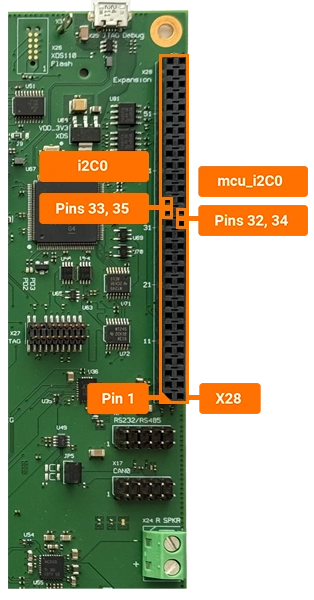
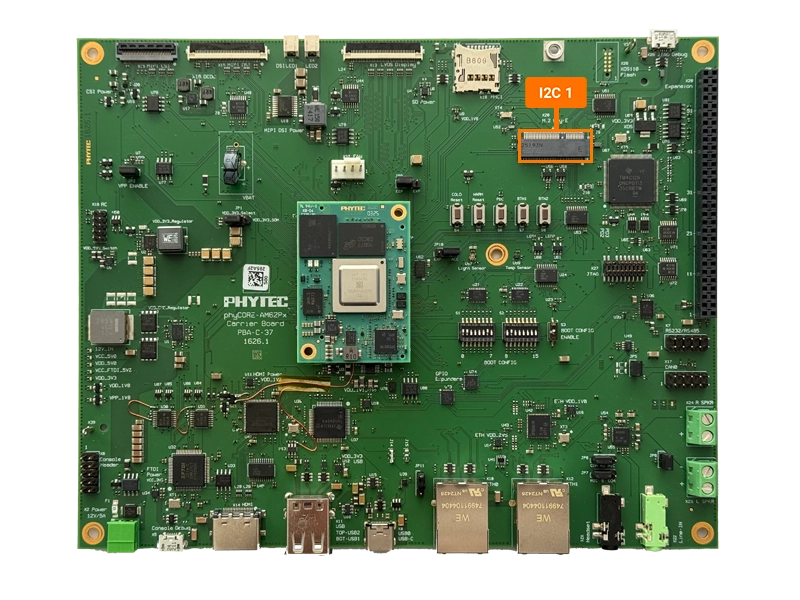
Only a subset of I2C interfaces are supported on the phyBOARD-Lynx AM62Px by default but others can be enabled via pin multiplexing.
Hardware Interface |
sysfs Path |
|---|---|
WKUP_I2C0 |
/dev/i2c-0 |
I2C0 |
/dev/i2c-1 |
I2C1 |
/dev/i2c-2 |
Scanning the I2C Buses
Power on the phyBOARD-Lynx AM62Px and boot into Linux.
List the available I2C devices. Each
/dev/i2c-*entry corresponds to one of the I2C interfaces in the table above.
phyboard-lynx-am62pxx-1:~# ls /dev/i2c*
Use the
i2cdetectcommand to scan each bus for devices. WKUP_I2C0 carries the SOM’s own devices (PMIC, EEPROMs, RTC). I2C0 is exposed on the X28 expansion header and has no carrier-board devices by default. I2C1 carries the carrier-board peripherals.
phyboard-lynx-am62pxx-1:~# i2cdetect -y -r 0
     0  1  2  3  4  5  6  7  8  9  a  b  c  d  e  f
00:                         -- -- -- -- -- -- -- --
10: -- -- -- -- -- -- -- -- -- -- -- -- -- -- -- --
20: -- -- -- -- -- -- -- -- -- -- -- -- -- -- -- --
30: UU -- -- -- -- -- -- -- -- -- -- -- -- -- -- --
40: UU -- -- -- -- -- -- -- -- -- -- -- -- -- -- --
50: UU UU UU -- -- -- -- -- 58 59 -- -- -- -- -- --
60: -- -- -- -- -- -- -- -- -- -- -- -- -- -- -- --
70: -- -- -- -- -- -- -- --
phyboard-lynx-am62pxx-1:~# i2cdetect -y -r 1
     0  1  2  3  4  5  6  7  8  9  a  b  c  d  e  f
00:                         -- -- -- -- -- -- -- --
10: -- -- -- -- -- -- -- -- -- -- -- -- -- -- -- --
20: -- -- -- -- -- -- -- -- -- -- -- -- -- -- -- --
30: -- -- -- -- -- -- -- -- -- -- -- -- -- -- -- --
40: -- -- -- -- -- -- -- -- -- -- -- -- -- -- -- --
50: -- -- -- -- -- -- -- -- -- -- -- -- -- -- -- --
60: -- -- -- -- -- -- -- -- -- -- -- -- -- -- -- --
70: -- -- -- -- -- -- -- --
phyboard-lynx-am62pxx-1:~# i2cdetect -y -r 2
     0  1  2  3  4  5  6  7  8  9  a  b  c  d  e  f
00:                         -- -- -- -- -- -- -- --
10: 10 -- -- -- -- -- -- -- UU -- -- -- -- -- -- --
20: UU UU -- -- -- -- -- -- -- -- -- -- -- -- -- --
30: -- -- -- -- -- -- -- -- -- -- -- UU -- -- -- --
40: 40 -- -- -- -- -- -- -- -- -- -- -- -- -- -- --
50: -- UU -- -- -- -- 56 -- -- 59 -- -- -- -- -- --
60: -- -- 62 -- -- -- -- -- -- -- -- -- -- -- -- --
70: -- -- -- -- -- -- -- --
Note
UU indicates that the device with that particular address is tied to a kernel driver and you will be unable to communicate with the device via i2c commands (i2cset and i2cget).
The detected interfaces on WKUP_I2C0 and I2C1 correspond to:
Interface |
Address (7-bit) |
Reference |
|---|---|---|
PMIC TPS65219 |
0x30 |
U6 |
VDD_CORE Regulator |
0x40 |
U7 |
PHYTEC EEPROM |
0x50 |
U8 |
Customer EEPROM |
0x51 |
U9 |
RTC |
0x52 |
U11 |
PHYTEC EEPROM identification page |
0x58 |
U8 |
Customer EEPROM identification page |
0x59 |
U9 |
Interface |
Address (7-bit) |
Reference |
|---|---|---|
Light Sensor VEML6030 |
0x10 |
U57 |
Audio Codec TLV320AIC3212 |
0x18 |
U55 |
GPIO Expander TCA6416A |
0x20 |
U73 |
GPIO Expander TCA6416A |
0x21 |
U74 |
HDMI Transmitter SiI9022A |
0x3B |
U47 |
EEPROM M24C32 |
0x51 |
U76 |
HDMI CEC Transmitter SiI9022A |
0x62 |
U47 |
Note
The list of visible I2C devices in your output may differ from what is shown above. This is because our System on Modules (SoMs) come in different variants, and some devices (like the RTC) are optional depending on the specific variant you are using.