EV Charging
EVSE Expansion Board
This application guide provides an overview and usage guide for PHYTEC’s EV Charger Expansion Board (PEB-X-005) - an accessory designed for developers to start evaluation of key circuitry and communication interfaces for a Electric Vehicle Supply Equipment (EVSE) design right at your desk. This guide covers evaluation of one PEB-X-005 board to bring up the PLC interface as well as connecting two systems to take the next step of SLAC communication. The Lumissil PLC is well suited for this type of development since the same hardware can be utilized for the EVSE and Plug-In Electric Vehicle (PEV)
Learn more or order the accessory kit here: https://www.phytec.com/product/evse-expansion-board/
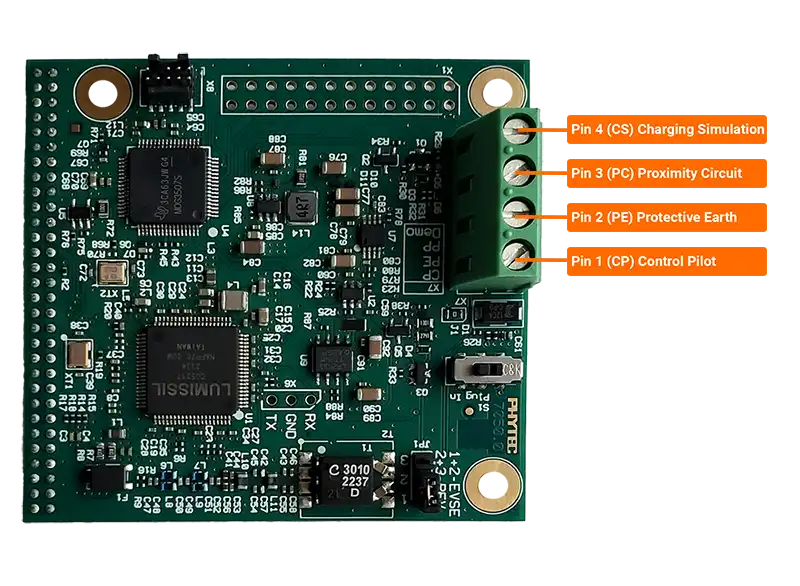
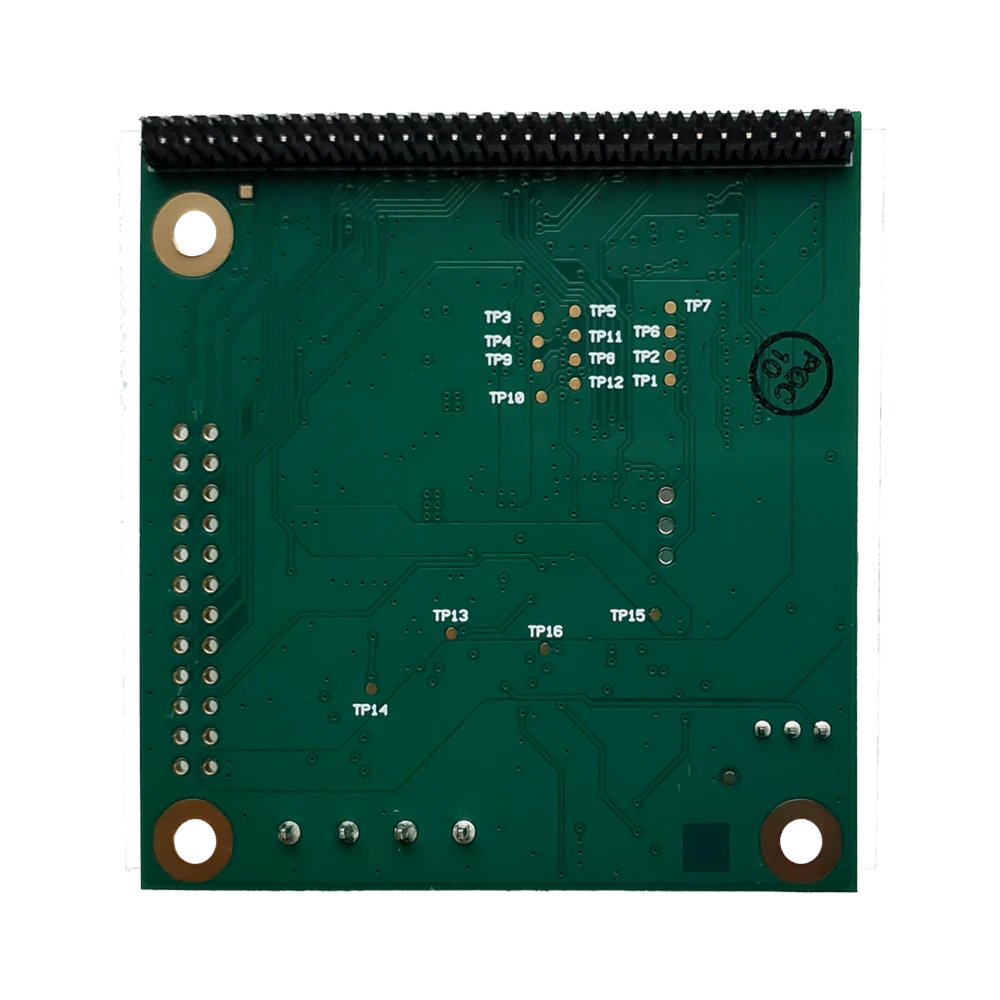
- Lumissil IS32CG5317
Interfaces with the phyCORE-AM62x SOM via a SPI bus.
Allows for HomePlug Green PHY low power communication
- Choose simulation mode via firmware load at runtime
Electric Vehicle Simulation
Electric Vehicle Charger Simulation
- TI MSPM0 Microcontroller
Integrated for Basic Charging using the ADC on the chip.
Attaching phyBOARD-Lyra AM62x + PEB-X-005
Requirements:
phyCORE-AM62x: System on Module
phyBOARD-Lyra AM62x: Carrier Board
PEB-X-005: Expansion board with Lumissil IS32CG5317 HPGP
5V USB-C Power Adapter (Included with Development Kit)
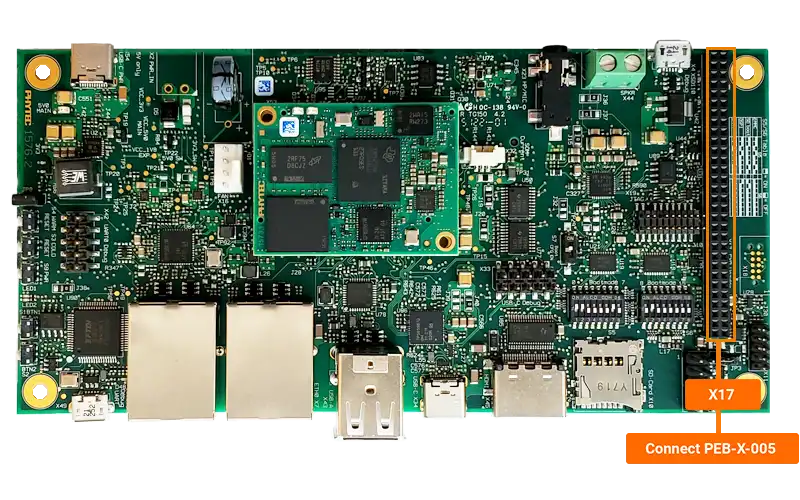
The PEB-X-005 is designed to be plugged in to the phyBOARD-Lyra AM62x’s X17 header.
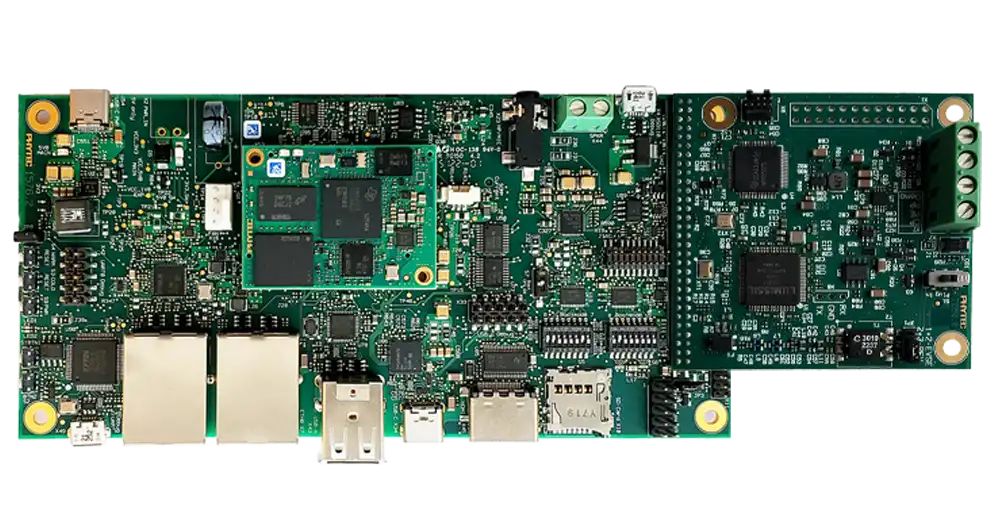
When all combined, the system allows you to simulate either a car or a charger, depending on what firmware is loaded into the Lumissil IS32CG5317.
Simulating Car and Charger SLAC Communication
Requirements
2 x phyBOARD-Lyra AM62x + PEB-X-005
2 x Jumper Wires (Not Included)
2 x 5V USB-C Power Adapter (Included with Development Kit)
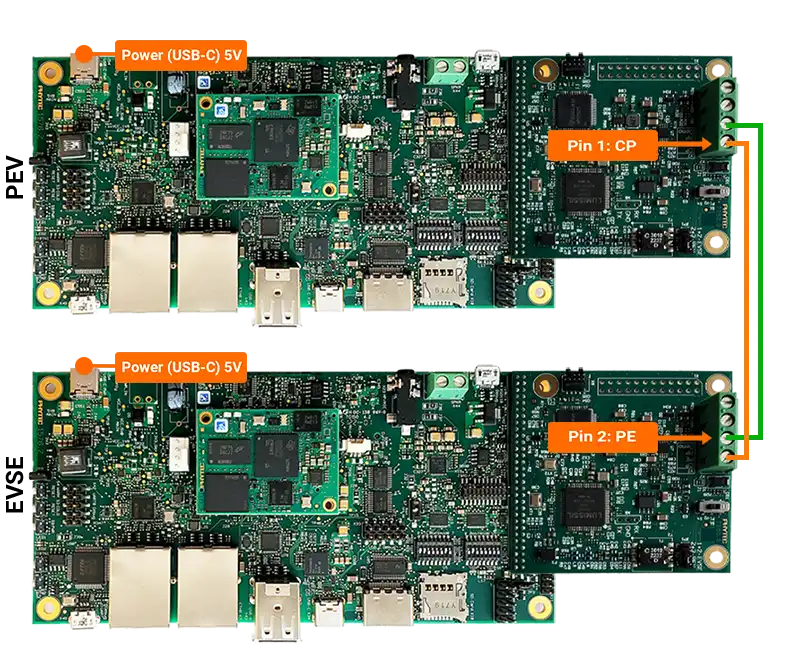
For this demo the two phyBOARD-Lyra AM62x + PEB-X-005 can be used to simulate the communication of a car and charger over a SLAC link.
Yocto Project - Prepare The BSP
Before adding the firmware make sure you are able to enter our Podman container and build the standard BSP. Please follow the Build the BSP guide before continuing.
Installing the Firmware
Note
The EVSE Expansion uses firmware provided by Lumissil. PHYTEC maintains a meta-lumissil-greenphy Yocto layer for installing the software.
To include the firmware we can do the following from within our container:
Initialize the BSP Environment:
Source the build environment (a build directory and the $BUILDDIR environment variable will be automatically setup):
sh-container:~$ source sources/oe-core/oe-init-build-env
Move to your Yocto Projects sources/ directory and clone the meta-layer:
sh-container:~$ cd $BUILDDIR/../sources
sh-container:~$ git clone -b scarthgap git@github.com:phytec/meta-lumissil-greenphy.git
Include the newly checked out layer in our Yocto Project:
sh-container:~$ bitbake-layers add-layer $BUILDDIR/../sources/meta-lumissil-greenphy
Finally move into the build directory and build our image. From our {yocto-project} we can run the following:
sh-container:~$ cd $BUILDDIR
sh-container:~$ bitbake phytec-lumissil-greenphy-image
This will build the phytec-headless-image and include the lumissil-greenphy software.
Note
You can check the phytec-lumissil-greenphy-image.bb file to see how the packages are included for reference if your adding the software to your own image.
Enabling Overlay in U-Boot
An overlay is required to enable the expansion board.
Stop in u-boot and run the following commands to enable the overlay:
sh-uboot=> setenv overlays k3-am62-phyboard-lyra-x17-evse.dtbo
sh-uboot=> saveenv
sh-uboot=> boot
Running Simulation
Once booted into Linux, we can update the config file to bring up the IS32CG5317 in the correct configuration.
Important
You MUST update the CG_RESET_GPIO_CHIP to /dev/gpiochip3 and configure the CFG_PATH depending on which board you are configuring.
The config file is located in /etc/lumissil/cg5317_0.cfg:
On PEV:
sh-phyboard-lyra-am62xx-3:~# vi /etc/lumissil/cg5317_0.cfg
RMII_FLAG=
FW_PATH=/usr/lib/firmware/lumissil/FW.bin
CFG_PATH=/usr/lib/firmware/lumissil/spi_ev_config.bin
SPI_IFNAME=seth0
ETH_IFNAME=
CG_RESET_GPIO_CHIP=/dev/gpiochip3
CG_RESET_GPIO_OFFSET=36
On EVSE:
RMII_FLAG=
FW_PATH=/usr/lib/firmware/lumissil/FW.bin
CFG_PATH=/usr/lib/firmware/lumissil/spi_evse_config.bin
SPI_IFNAME=seth0
ETH_IFNAME=
CG_RESET_GPIO_CHIP=/dev/gpiochip3
CG_RESET_GPIO_OFFSET=36
Once the config file is updated we can reboot the boards to load the new configuration.
Once the boards have rebooted, you can initiate communication between boards by running the following SLAC commands:
On the PEV run:
sh-phyboard-lyra-am62xx-3:~# pev -p /etc/pev.ini -i seth0
On the EVSE run:
sh-phyboard-lyra-am62xx-3:~# evse -p /etc/evse.ini -i seth0
Confirm that connection happens and “Charging” prints on both terminals.
Verifying Services and Hardware
These are a set of commands to verify that the Lumissil services are running and the hardware is detected correctly.
Verification
sh-phyboard-lyra-am62xx-3:~# dmesg | grep spi
Expected Output:
sh-phyboard-lyra-am62xx-3:~# dmesg | grep spi
[    1.378411] spi-nor spi0.0: mt35xu512aba (65536 Kbytes)
[    1.384400] 5 fixed-partitions partitions found on MTD device fc40000.spi.0
[    1.391388] Creating 5 MTD partitions on "fc40000.spi.0":
[    1.396785] 0x000000000000-0x000000080000 : "ospi.tiboot3"
[    1.403725] 0x000000080000-0x000000280000 : "ospi.tispl"
[    1.410297] 0x000000280000-0x000000680000 : "ospi.u-boot"
[    1.416887] 0x000000680000-0x0000006c0000 : "ospi.env"
[    1.423172] 0x0000006c0000-0x000000700000 : "ospi.env.backup"
[    4.200768] Initialising lms_eth2spi version 0.0.8
[    5.748718] lms_eth2spi spi1.0: SPI controller min possible speed  : 1525Hz
[    5.756107] lms_eth2spi spi1.0: SPI controller max possible speed   : 50000000Hz
[    5.770392] lms_eth2spi spi1.0: SPI lms driver configured max speed : 1000000Hz
[    5.780238] lms_eth2spi spi1.0: Translation to 'LSB first' happens in software
[    5.801912] lms_eth2spi spi1.0: Status 0 sanity check passed
[    5.808133] lms_eth2spi spi1.0: Using random MAC address: 00:16:e8:b9:c8:2a
[    5.817810] lms_eth2spi spi1.0: Registered net device: seth0
Key Indicators:
lms_eth2spi driver initialization
Successful sanity check
Network device seth0 registration
Check Network Interface
sh-phyboard-lyra-am62xx-3:~# ip link show seth0
Host Services
The system includes a systemd services and a systemd network configuration that handle device initialization:
seth0.network Config
sh-phyboard-lyra-am62xx-3:~# networkctl status seth0
Expected Output:
sh-phyboard-lyra-am62xx-3:~# networkctl status seth0
* 4: seth0
                  Link File: /usr/lib/systemd/network/99-default.link
               Network File: /usr/lib/systemd/network/25-seth0.network
                     State: degraded (configured)
               Online state: online
                        Type: ether
                        Path: platform-20100000.spi-cs-0
                     Driver: lms_eth2spi
            Hardware Address: 00:16:E8:00:00:02
                        MTU: 1500 (min: 46, max: 1500)
                     QDisc: pfifo_fast
IPv6 Address Generation Mode: none
   Number of Queues (Tx/Rx): 1/1
                     Address: 169.254.187.93
         Activation Policy: always-up
         Required For Online: yes
cg5317-host@ Service
sh-phyboard-lyra-am62xx-3:~# systemctl status cg5317-host@0
Expected Output:
sh-phyboard-lyra-am62xx-3:~# systemctl status cg5317-host@0
* cg5317-host@0.service - CG5317_0 Host FW Loading
   Loaded: loaded (/usr/lib/systemd/system/cg5317-host@.service; enabled; preset: disabled)
   Active: active (running) since Thu 2025-12-04 12:15:22 UTC; 50s ago
   Process: 251 ExecStart=/root/lumissil_examples/host_loading_service/host_loading_service ${RMII_FLAG} -f ${FW_PATH} -c ${CFG_PATH} -s ${SPI_IFNAME} -e ${ETH_IFNAME} -g ${CG_RESET_GPIO_CHIP} -o ${CG_RESET_GPIO_OFFSET} (code=exited, status=0/SUCCESS)
   Main PID: 253 (host_loading_se)
      Tasks: 2 (limit: 2086)
   Memory: 988.0K (peak: 1.4M)
      CPU: 252ms
Key Log Messages:
FW LOAD API: Com channel opened
FW LOAD API: Device queried
FW LOAD API: finished sending fw loading commands
FW LOAD API: Query reply received and FW is running
Device Communication
Management Tool
The included management tool allows communication with connected PLC devices. Cross-compiled binaries are located in /root/lumissil_examples/.
Device Information Query
To retrieve device information, use the management tool with the device’s MAC address:
sh-phyboard-lyra-am62xx-3:~# ./lumissil_examples/management_tool/management_tool -a `cat /sys/class/net/seth0/address` -c "device_info 3"
Successful Output:
Destination mac address not provided (-d)   -> using broadcast (FF:FF:FF:FF:FF:FF)
device_info:
     cco mode                      = 1 (never)
     host iface                    = 0 (SPI)
     Terminal Equipment Identifier = 0
     MAC address                   = 00:16:E8:00:00:02
     Manufacturer HFID             = Lumissil
     User HFID                     = userHFID
     AVLN HFID                     = AVLNHFID
     Network Membership Key        = 2D7552AB56297611142B534A090D983E
     Network Identifier            = 4969E63564A20F
     security level                = 0 (Simple connect)
     SNID                          = 0x03
     Max Receiver sensitivity      = 43 dB
     PLC Frequency selection       = 0 (50 Hz)

command: 'device_info 3' finished successfully
Note
For any technical questions, feel free to reach out to PHYTEC’s Support Portal!